The Future of CNC Setup Sheets: Digital Work Instructions and ERP Integration
Discover how digital work instructions and ERP integration are transforming CNC setup sheets, helping machine shops reduce setup times, improve accuracy, and increase productivity.
Table of Contents
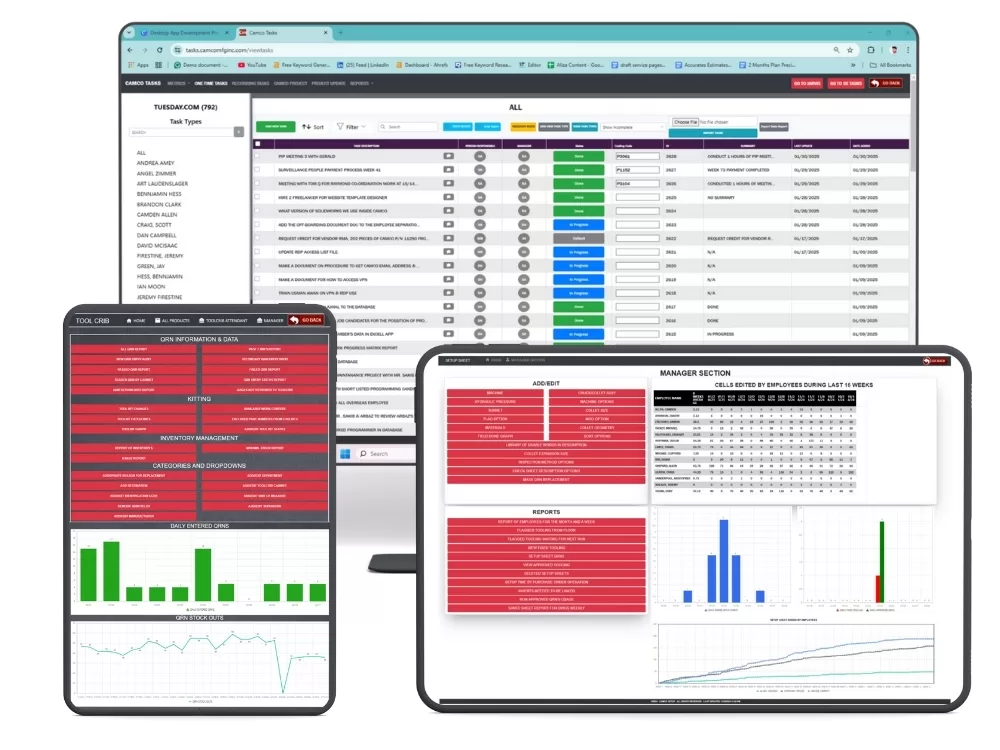
CNC machine shops are under constant pressure to improve productivity, reduce setup times, and deliver high-quality parts faster. While machining technology has advanced significantly, many manufacturers still rely on paper setup sheets, spreadsheets, and disconnected processes to manage setups.
Traditional methods often create:
- Inconsistent machine setups
- Missing tooling information
- Longer setup times
- Communication gaps
- Increased risk of errors
- Limited production visibility
As manufacturing moves toward Industry 4.0, machine shops are adopting digital CNC setup sheets and connecting them to ERP systems. Adoption still has room to grow: a 2026 benchmark report covered by Advanced Manufacturing found 78% of manufacturers haven’t fully integrated Industry 4.0. Our Industry 4.0 guide for machine shops covers where to begin.
The direction is clear: combine digital work instructions with ERP integration to streamline setups and improve performance.
The Evolution of CNC Setup Sheets
A setup sheet gives operators the information needed to prepare a machine for production. It typically contains:
- Part numbers
- Drawing references
- Material specifications
- Tool requirements
- Cutting parameters
- Fixture information
- Setup instructions
For years these existed as paper forms or Excel spreadsheets. They worked, but modern shops need more speed, accuracy, and accessibility. For the case for leaving paper behind, see why machine shops are replacing paper setup sheets.
Why Traditional Setup Sheets Fall Short
Shops now handle more product variations, shorter runs, tighter schedules, higher customer expectations, and more production data. Paper struggles to keep up:
Limited Accessibility
Operators often search for physical documents or request updated versions.
Version Control Issues
Multiple spreadsheet versions can put outdated instructions on the floor.
Manual Updates
Tooling and process changes require time-consuming document revisions.
No Real-Time Information
Paper can’t reflect changes in inventory, tooling availability, or schedules.
What Are Digital Work Instructions?
Digital work instructions are electronic, interactive documents that give operators the information needed to complete setups and production tasks. Siemens describes electronic work instructions as step-by-step operator guidance that can include text, images, diagrams, video, and data collection.
They can include:
- Images and diagrams
- Visual setup guides
- Tool information
- Machine-specific requirements
- Operator notes
- Standardized procedures
They can be opened on computers, tablets, shop floor terminals, or mobile devices. We cover how to build and roll them out in digital work instructions for CNC operators.
How ERP Integration Enhances CNC Setup Sheets
Digital setup sheets improve access and standardization. Their value grows when connected to Machine Shop ERP software and real manufacturing data.
Job Information Pulled from Existing Data
Instead of retyping, a connected system can populate setup sheets with part information, drawing numbers, material specifications, and machine assignments. That reduces repetitive manual entry.
Tooling Data That Stays in Sync
When a tool crib system is connected, the setup sheet can reflect:
- Tool availability
- Tool inventory
- Maintenance records
- Machine-specific tooling
That way operators only see tooling options that are available and approved for the machine in question. Texono’s ToolCrib Application is built to sync this way.
Inventory and Material Visibility
A connected setup sheet can show current material information, so teams can spot shortages before setup begins.
Scheduling Alignment
Integration can keep setup sheets aligned with production schedules, so setup information stays consistent with what the shop is actually running. The same idea applies to real-time shop floor tracking.
One Source of Truth
Setup information becomes part of a single platform covering production, inventory, tooling, scheduling, and reporting.
Benefits of Digital Setup Sheets and ERP Integration
Reduced Setup Times
Standardized, accessible instructions cut the time spent searching and verifying. Our guide to standardizing CNC machine setups shows how to structure that.
Improved Accuracy
Synchronized data minimizes manual errors and helps operators use current information.
Better Shop Floor Visibility
Managers can see setup progress, machine status, schedules, and resource availability.
Faster Operator Training
Clear instructions and visual references bring new operators up to speed faster. See training CNC operators on digital process sheets.
Better Decisions
ERP analytics show setup performance and where to improve. The metrics are the same ones in our machine shop ERP analytics and KPI guide.
The Role of Industry 4.0 in CNC Manufacturing
Industry 4.0 focuses on connected, intelligent manufacturing. Digital setup sheets and ERP integration are building blocks of it. By connecting machines, people, and production information, shops can gain:
- Greater operational visibility
- Improved resource planning
- Automated workflows
- Data-supported decisions
- Higher manufacturing efficiency
What the Future Looks Like for Machine Shops
Capabilities that may become common include:
AI-Assisted Setup Recommendations
Systems that suggest tooling and setup configurations based on past jobs. Texono also builds custom AI applications for manufacturers exploring this.
Predictive Maintenance Integration
Alerts when tooling or machines need attention.
Real-Time Performance Analytics
Live dashboards for setup efficiency and production performance.
Paperless Manufacturing
Fully digital workflows that remove paper documents and manual entry.
Intelligent Automation
Workflows that keep tuning production as conditions change.
What This Looks Like with Texono
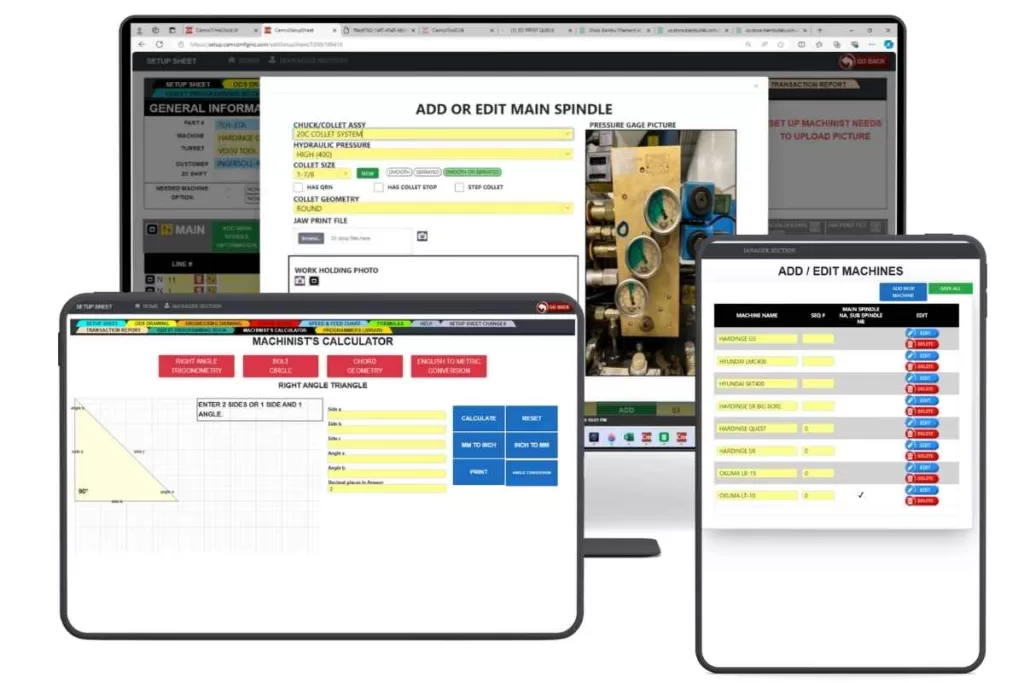
Texono’s Setup Sheet Application is a custom web app for CNC lathes, mills, and drills. Operators select a machine and part, and the app pulls job data from your existing databases to generate a sheet with tooling and step-by-step instructions. It has an optional ToolCrib integration for tooling sync and is a custom module of Texono’s Manufacturing ERP. For a buyer’s overview, see our CNC setup sheet software guide.
Frequently Asked Questions
A setup sheet records what’s needed for a job (tools, offsets, fixtures). A work instruction guides the operator through the steps. Many systems combine both.
No. You can start with a standalone setup sheet app. ERP integration adds value as you connect tooling, inventory, and scheduling.
Tooling data is usually the best first connection, because it changes often and causes the most setup delays when it’s wrong.
Conclusion
Traditional setup sheets have served machine shops for decades, but modern manufacturing requires more speed, visibility, and flexibility.
Digital work instructions and ERP integration transform CNC setup sheets from static documents into intelligent, connected manufacturing tools.
Key Benefits:
✅ Faster machine setups
✅ Improved setup accuracy
✅ Real-time production visibility
✅ Better tooling and inventory management
✅ Faster operator training
✅ Increased productivity
The future of CNC manufacturing is connected, data-driven, and increasingly paperless. Machine shops that invest in digital setup sheets and ERP integration today will be better prepared to compete in the next generation of manufacturing.
Call-to-Action
Ready to modernize your machine setup process?
Discover how Texono’s Setup Sheet Application and Machine Shop ERP Software help manufacturers create digital work instructions and connect production data. Talk to the team or book a demo below.

We help your business grow with powerful SaaS solutions
Resources
© 2026 Texono. All rights reserved.