Digital Work Instructions for CNC Operators
Learn how digital work instructions help CNC operators use the right setup, tools, offsets, checks, and revision at the machine..
Table of Contents

Practical guide to faster setups, fewer errors, and better shop-floor control
Picture this: an operator starts a repeat job and finds two setup sheets with the same part number. One has a handwritten note about a fixture change. The other has a newer tool list, but nobody is sure who approved it. The machine is waiting, the schedule is tight, and the operator has to decide which document to trust.
That is not an operator problem. It is an information-control problem.
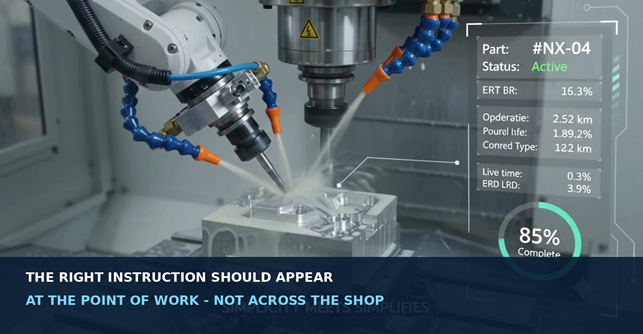
Digital work instructions solve that problem by delivering the approved setup, visuals, checks, and process notes at the point of work. For CNC operators, the goal is simple: show the right information for the right part, operation, machine, and revision — without forcing people to search through binders, shared folders, old emails, or somebody else’s memory. This is exactly the gap Texono’s Setup Sheet Application is built to close.
The key idea Digital work instruction is not simply a scanned PDF. A useful system guides the operator through the work, controls revisions, shows visual evidence, captures required checks, and provides a clear path when something does not match. |
What Are Digital Work Instructions for CNC Operators?
The Digital work instruction is a controlled, screen-based guide for a specific manufacturing task. Operators can access it on a tablet, workstation, machine-side screen, or mobile device. It may also be linked directly to a part number, job, operation, CNC program, or machine.
Unlike a static paper sheet, a well-designed digital instruction can combine:
- Short, numbered steps written in shop-floor language.
- Setup photographs, fixture views, diagrams, and marked-up drawings.
- Approved tool lists, holder details, expected offsets, and program references.
- First-article and in-process inspection points.
- Required acknowledgements, measurements, comments, and electronic sign-off.
- Revision control so the current approved method is the version operators see.
- Links to related files, short videos, maintenance notes, or escalation contacts.
Siemens’ own documentation on electronic work instructions describes the same practical idea: step-by-step operator guidance that may contain text, images, diagrams, video, 3D content, data collection, approvals, and controlled revisions. The technology matters, but the quality of the instruction matters more. A confusing process does not become clear just because it is displayed on a tablet.
Why Paper Instructions Become Fragile in a Growing CNC Shop
Paper is not automatically bad. A stable, low-volume process with very few changes may run perfectly well with a clear, controlled setup sheet. The problem appears when the shop adds more machines, more shifts, more revisions, more customers, and more product variation — the same growth pattern we cover in 15 signs your machine shop has outgrown Excel.
The wrong revision can remain at the machine
A printed instruction may still look official even after the program, fixture, cutting tool, inspection requirement, or customer drawing has changed. Unless old copies are removed every time, operators may unknowingly follow an outdated method.
Critical knowledge stays in people's heads
Experienced operators often know the small details that make a setup work: the safe sequence for loading a fixture, the best viewing angle for checking clearance, or the warning sign that a tool is wearing. When that knowledge is not documented, every repeat job depends on finding the right person.
Photos and handwritten notes become disconnected
A setup photo may live on one person’s phone, the tool list in a spreadsheet, the inspection plan in another folder, and the latest note in an email. The operator has information, but not one trusted source.
Different shifts create different methods
When instructions are open to interpretation, each shift may develop its own sequence. That inconsistency can increase setup questions, rework, and troubleshooting time — the same friction we cover in standardizing CNC machine setups.
Feedback does not easily return to engineering
A handwritten improvement may help one operator today but never become part of the controlled process. Digital systems can give operators a structured way to report a problem or suggest an improvement without editing the approved instruction directly.
Why Paper Instructions Become Hard to Control
Paper can work well for simple, stable jobs. However, problems grow when a shop adds more machines, shifts, product changes, and revisions.
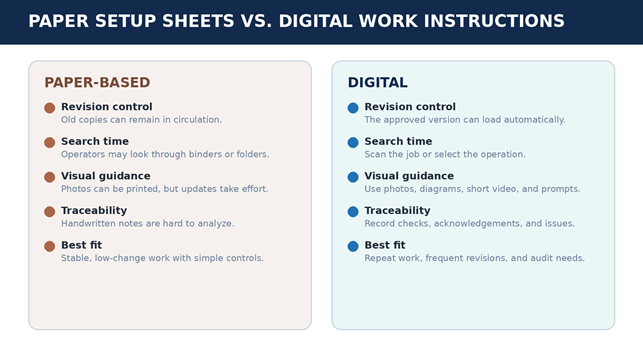
Old copies stay at the machine: Printed instructions often look official even after the program, fixture, tool, or drawing has changed.
Knowledge stays in people’s heads: Small setup details may depend on finding an experienced operator instead of using a controlled method.
Photos and notes get separated: Images, spreadsheets, emails, and handwritten comments become different sources instead of one trusted source.
Different shifts use different methods: Unclear instructions can create different setup sequences, more questions, and more rework.
Feedback gets lost: Useful operator comments may help one shift but never reach engineering or the next approved revision.
What every CNC instruction should contain
Keep it short, but complete. A qualified operator should be able to confirm the job and follow the approved process without guessing.
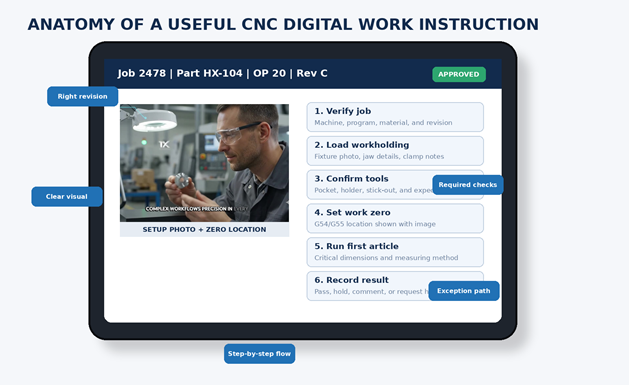
- Job identity and revision — part, operation, material, machine, CNC program, and current revision.
- Safety and readiness — only approved checks, PPE, hazards, and references to shop procedures.
- Workholding visuals — clear images of jaws, stops, clamps, part orientation, and the finished setup.
- Tooling information — tool pocket, holder, cutter or insert, coolant, and approved reference values. For shops tracking this centrally, our ToolCrib Application ties this tooling data directly into job records.
- Work zero — a clear image or drawing showing the X, Y, and Z reference.
Build Instructions Around the Operator’s Workflow
The remaining essentials
- Step-by-step setup sequence — one action per step, in the real order used at the machine.
- First-article and in-process checks — what to measure, when to measure it, and the accepted limits.
- Expected result — photos or examples of the correct setup, finish, orientation, or condition.
- Exception path — what to do if a tool is missing, a dimension fails, or the instruction looks wrong.
- Approval history — who created, reviewed, and approved the instruction and what changed.
How the operator flow changes
- Open the active job by scanning a traveler, barcode, or QR code, or selecting the scheduled job.
- Confirm the part, operation, material, machine, program, and revision before setup.
- Follow the approved visual sequence instead of searching through folders or binders.
- Record only the checks that need evidence or quality control.
- Stop and escalate clearly when something does not match.
- Send useful feedback back to engineering so approved improvements can enter the next revision.
Design rule
Do not make operators click through ten screens for a five-step setup. The interface should fit the work, the device, the lighting, gloves, and the pace of the shop floor.
A Practical, Low-Risk Rollout Plan
Do not digitize every binder at once. Start with one repeat job where the problem is already visible: long setup searches, frequent questions, revision confusion, or inconsistent results between shifts.
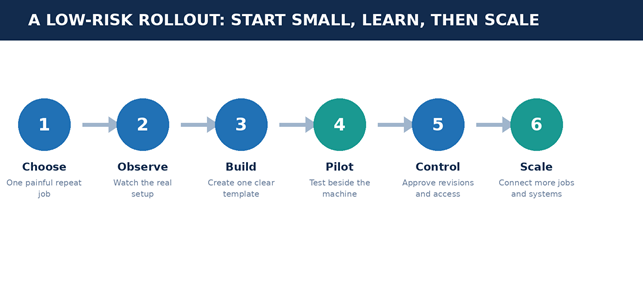
Choose: Pick one measurable problem and record a simple baseline such as search time, setup questions, or first-article delays.
Observe: Watch qualified operators do the real setup. Note where they hesitate, what they check, and what information they need.
Build: Use one clear template for identity, safety, visuals, tools, zero location, steps, checks, and approvals.
Pilot: Test it beside the machine and check readability, device location, glare, gloves, oil exposure, and network reliability.
Control: Define who may draft, review, approve, publish, and retire instructions.
Scale: Connect more jobs and systems only when the integration removes duplicate work or prevents a real mismatch. Our guide on training CNC operators on digital process sheets covers this rollout step in more detail.
Common mistakes to avoid
Avoid turning a weak paper sheet into a scanned PDF without improving content.
Never show too much information on a single screen.
Involve experienced operators when designing the system workflow.
Replace wide or unclear photos with clear, labeled close-ups.
Do not assume Wi-Fi will always be perfect on the shop floor.
Assign a clear owner and revision process to every instruction.
Focus on measuring real results (like reduced search time) rather than software logins.
A Simple Shop-Floor Example
Imagine a repeat Op 20 setup for an aluminum housing. After scanning the traveler, the operator opens the approved Rev C instruction. On the first screen, they confirm the material, machine, program, fixture, and revision. Next, clear visuals show the soft-jaw setup, part orientation, tools, work zero, and first-article checks.
If a measurement falls outside the approved limit, the issue is not left in a handwritten note. Instead, the job follows the shop’s approved process: stop the work, place it on hold, add a comment or photo, and contact the responsible person. Any process improvement is reviewed before being included in the next approved revision.
The best instruction feels like part of the job
CNC operators do not need more software for its own sake. They need trusted information that is quick to find, easy to understand, and tied to the job in front of them. Start with one setup that causes repeated questions, build the instruction with the operators, test it beside the machine, and scale only what works. If you’re ready to move past paper and spreadsheets entirely, our Machine Shop ERP connects digital work instructions with scheduling, costing, and tool crib data in one system.
Ready to replace paper setup sheets? Texono IT Solutions builds custom machine-shop software, digital setup-sheet applications, mobile tools, and connected manufacturing systems. Website: texono.com | Email: info@texono.com | Phone/WhatsApp: +92 302 8001000 |
Safety note: This article is general information, not a machine-specific operating or safety procedure. Always follow approved shop procedures, machine documentation, tooling data, engineering requirements, and qualified supervision.
Technical background: Siemens Electronic Work Instructions; SAP Help Portal Work Instructions; NIST Manufacturing Innovation Blog; PTC Digital Work Instructions.
Frequently Asked Questions
No — even lower-volume shops benefit once revision control and shift-to-shift consistency become a problem, which often happens well before volume gets high.
Well-designed systems shouldn’t require much more than basic tablet familiarity. If operators need extensive training just to navigate the interface, that’s usually a sign the system is too complex for the shop floor.
Digitizing a weak paper process as-is, rather than improving the content and structure along the way. A scanned PDF on a tablet is still a scanned PDF.
Call to Action
Ready to Make Your CNC Shop More Efficient?
Move from outdated paper instructions to a smarter digital workflow. Texono helps machine shops create custom digital work instruction systems that make setups faster, reduce errors, and keep every operator working with the latest approved information — built into our Setup Sheet Application.

We help your business grow with powerful SaaS solutions
Resources
© 2026 Texono. All rights reserved.