The Ultimate Guide to Manufacturing ERP Systems
Discover how modern manufacturing ERP software streamlines production, improves inventory accuracy, and boosts profitability.
Table of Contents
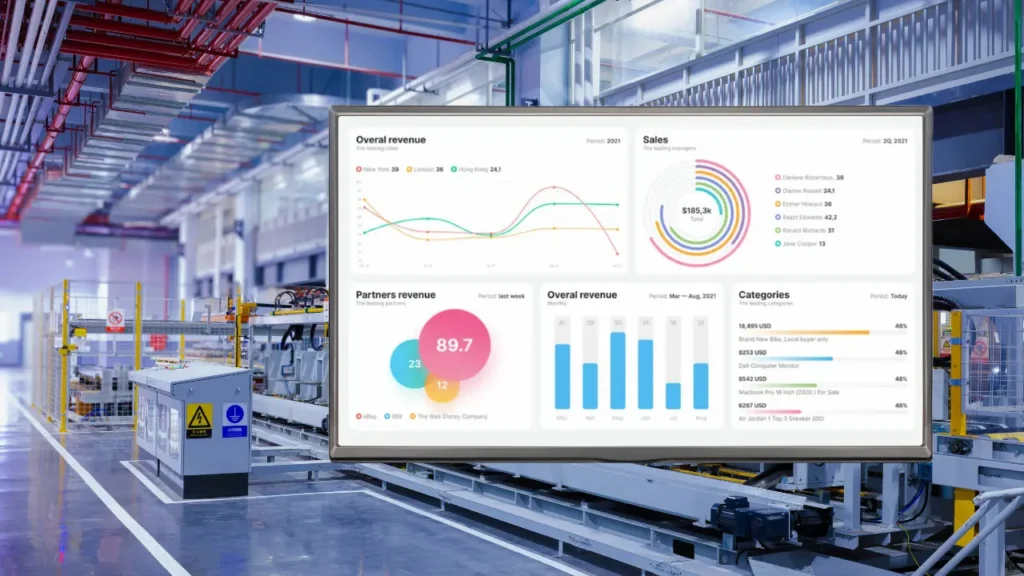
If you peek into the back office of a growing factory today, you’ll usually find the same high-stakes juggling act. On one screen, a production manager is tweaking a spreadsheet. On another, a customer service rep is apologizing to a key client because an order was delayed by a missing $5 part. Meanwhile, the warehouse manager is searching for raw materials the system says arrived three days ago.
It isn’t a lack of hard work causing these headaches. It’s fragmented operational control. When inventory, shop floor, procurement, and accounting speak different languages, small gaps turn into financial leaks. That’s why growing companies replace disconnected tools with an integrated manufacturing ERP system.
The High Cost of the "Spreadsheet Band-Aid"
Every manufacturing company starts small. Whiteboards, Excel sheets, and phone calls work fine at first. As order volume grows, that homemade system breaks down. We cover the tipping point in 15 signs your machine shop has outgrown Excel.
| Did you know? Industry research reported by Quality Digest, citing AMR Research, estimates manufacturers can lose up to 20% of productive capacity to inefficient, paper-based processes. |
|---|
Here’s what happens when operations rely on scattered tools:
- Phantom inventory: the system shows stock, but the shelf is empty when assembly begins.
- Production bottlenecks: expensive CNC machines sit idle waiting for missing components.
- Inaccurate costing: you don’t know your real margin on a custom order until weeks after it ships.
- Compliance risk: tracking lot numbers and material certifications by hand becomes an audit headache.
What Does a Manufacturing ERP Do?
Think of ERP (enterprise resource planning) as the central nervous system of your factory. Instead of isolated islands of data, every action feeds one live dashboard. For a plain-language intro, see what manufacturing ERP software is.
When a sales rep books an order, the system checks raw material availability. If stock is low, it can generate purchase orders based on vendor lead times, and it schedules production against machine capacity.
Core Modules to Look For
- Material requirements planning (MRP): work orders and material purchasing tied to demand.
- Bill of materials (BOM) control: tracking for complex assemblies, revisions, and scrap allowances.
- Shop floor tracking: live job status without walking the floor. See real-time shop floor tracking.
- Costing: estimated vs. actual cost by job, covered in our cost tracking guide.
- Inventory and purchasing: warehouse data connected to accounting, without manual reconciliation.
- Machine data (optional): connections to sensors and controllers for utilization metrics, covered in our Industry 4.0 guide.
For a deeper list, read 10 ERP features every manufacturer should look for in 2026.
Legacy vs. Modern Cloud ERP
| Priority | Legacy on-premise systems | Modern cloud ERP |
|---|---|---|
| Implementation | Often long and disruptive | Typically faster and phased |
| Upfront cost | Heavy server and license fees | Subscription-based, scalable |
| Integration | Custom code often required | Usually built around modern integrations |
| Visibility | Batch updates, manual reports | Live data and dashboards |
The cloud isn’t automatically right for every shop. See the benefits of cloud manufacturing ERP for the case in favor, and weigh it against your own IT and security needs.
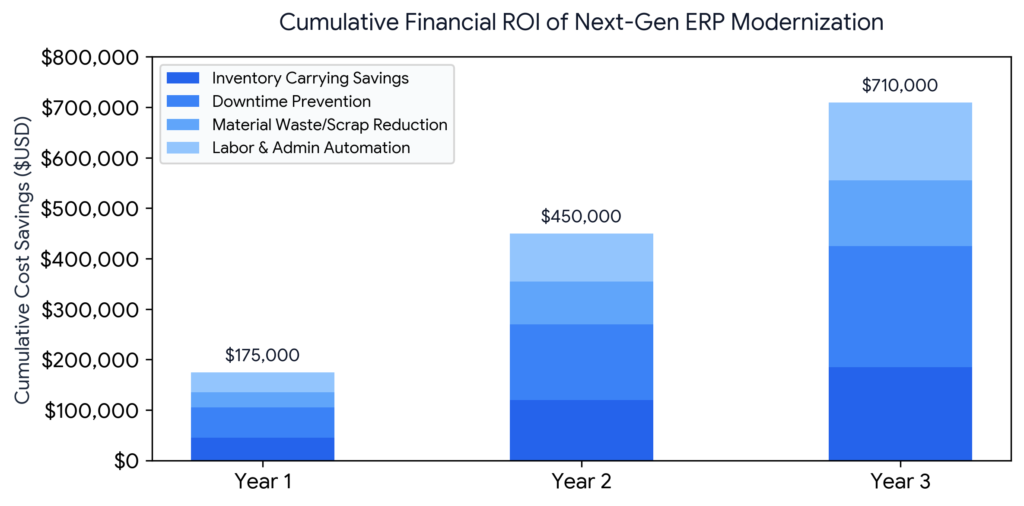
How to Choose a Manufacturing ERP
- Start with your biggest problem. Delays, bad inventory data, or inaccurate costing? Rank vendors against that.
- Check industry fit. A system built for job shops handles setups, tooling, and work orders better than a generic business suite.
- Ask about deployment. Cloud, on-premises, or owned outright can change your cost over five to ten years. See our ERP pricing guide.
- Plan for people. A survey of 300+ North American manufacturers and distributors by Mint Jutras found 67% rated their ERP implementation successful, with top management support and change management as the main drivers.
A Low-Risk Rollout
- Pick one process (scheduling, inventory, or costing) and move it first.
- Involve the people who’ll use it daily.
- Run old and new systems side by side briefly.
- Expand module by module once the first one proves itself.
This phased approach is also how most shops avoid the downtime described in how machine shop ERP eliminates production delays.
Frequently Asked Questions
Software that connects production, inventory, purchasing, costing, and other functions in one system so everyone works from the same data.
No. Small shops often feel the pain of disconnected tools first. See ERP vs Excel for machine shops.
It depends on scope. Starting with one module is usually quicker than a full rollout.
No. Most shops migrate one process at a time.
Conclusion
A manufacturing ERP is a strategic tool: it centralizes real-time data, improves shop floor visibility, and removes the bottlenecks that come from disconnected processes. The right system turns scattered operations into one coordinated workflow.
Call to Action
Ready to modernize your manufacturing operations?
See how a tailored ERP can help you streamline production, reduce overhead, and grow profitably. Talk to the Texono team, or book a demo below.

We help your business grow with powerful SaaS solutions
Resources
© 2026 Texono. All rights reserved.